Bash script to associate all code files with VS Code on MacOS
Managing default applications on a fresh Mac is a hassle (always open with doesn’t work 100% of the time), so here’s a bash script. I keep it as a part of my dotfiles.
vscode_defaults.sh
#!/usr/bin/env bash
#
# associate_code_with_vscode.sh
#
# Sets VS Code as the default app for code/text file extensions on macOS.
# Extensions are pulled live from GitHub Linguist's languages.yml (the same
# data GitHub itself uses for language detection), instead of being
# hardcoded, so the list stays current as languages are added/removed.
#
# Uses `duti`, the standard CLI tool for managing Launch Services file
# associations (the same database the Finder "Open With > Always Open With"
# menu writes to).
#
# Usage:
#   chmod +x associate_code_with_vscode.sh
#   ./associate_code_with_vscode.sh
#
#   # Only programming languages, skip markup/data/prose:
#   LINGUIST_TYPES=programming ./associate_code_with_vscode.sh
#
# Notes:
#   - Requires Homebrew (https://brew.sh) to auto-install duti if missing.
#   - Requires network access to raw.githubusercontent.com.
#   - VS Code's bundle identifier is com.microsoft.VSCode. If you use
#     VS Code Insiders, change BUNDLE_ID below to com.microsoft.VSCodeInsiders.
#   - After running, you may need to log out/in (or restart the Dock/Finder)
#     for some associations to visibly refresh, though duti changes usually
#     take effect immediately for new "Open" actions.

set -euo pipefail

BUNDLE_ID="com.microsoft.VSCode"

# linguist's languages.yml tags every language with one of four types:
# programming, markup, data, prose. Override with the LINGUIST_TYPES env
# var (comma-separated) to narrow this, e.g. LINGUIST_TYPES=programming
LINGUIST_TYPES="${LINGUIST_TYPES:-programming,markup,data,prose}"
LANGUAGES_YML_URL="https://raw.githubusercontent.com/github-linguist/linguist/main/lib/linguist/languages.yml"

# --- Sanity checks -----------------------------------------------------

if [[ "$(uname)" != "Darwin" ]]; then
  echo "This script only works on macOS." >&2
  exit 1
fi

if ! osascript -e "id of app \"Visual Studio Code\"" >/dev/null 2>&1; then
  echo "Warning: couldn't confirm Visual Studio Code is installed/registered." >&2
  echo "Make sure you've opened VS Code at least once so macOS knows about it." >&2
fi

# --- Ensure duti and curl are available ----------------------------------

if ! command -v curl >/dev/null 2>&1; then
  echo "curl is required but not found (unexpected on macOS)." >&2
  exit 1
fi

if ! command -v duti >/dev/null 2>&1; then
  echo "duti not found. Attempting to install via Homebrew..."
  if ! command -v brew >/dev/null 2>&1; then
    echo "Homebrew is not installed. Install it from https://brew.sh and re-run this script," >&2
    echo "or install duti manually: brew install duti" >&2
    exit 1
  fi
  brew install duti
fi

# --- Fetch languages.yml and extract extensions ---------------------------

TMP_YML="$(mktemp /tmp/languages.XXXXXX.yml)"
trap 'rm -f "$TMP_YML"' EXIT

echo "Downloading language definitions from linguist..."
if ! curl -fsSL "$LANGUAGES_YML_URL" -o "$TMP_YML"; then
  echo "Failed to download $LANGUAGES_YML_URL" >&2
  echo "Check your network connection / the raw.githubusercontent.com domain." >&2
  exit 1
fi

# languages.yml looks like:
#
#   Python:
#     type: programming
#     ...
#     extensions:
#     - ".py"
#     - ".pyi"
#
# Top-level language names start at column 0; everything else is indented
# two spaces. List items under "extensions:" sit at that same 2-space
# indent (valid YAML for a block sequence value). This awk script walks
# the file as a small state machine: track the current language's "type",
# and while inside its "extensions:" block, emit each item if its type is
# in the allowed set.
EXTENSIONS_RAW="$(awk -v types="$LINGUIST_TYPES" '
  BEGIN {
    n = split(types, allowed_list, ",")
    for (i = 1; i <= n; i++) allowed[allowed_list[i]] = 1
    cur_type = ""
    in_ext = 0
  }
  /^[^ ].*:[[:space:]]*$/ {
    cur_type = ""
    in_ext = 0
    next
  }
  /^  type:/ {
    val = $0
    sub(/^  type:[ ]*/, "", val)
    gsub(/"/, "", val)
    cur_type = val
    in_ext = 0
    next
  }
  /^  extensions:[[:space:]]*$/ {
    in_ext = 1
    next
  }
  in_ext && /^  - / {
    val = $0
    sub(/^  - /, "", val)
    gsub(/"/, "", val)
    sub(/^\./, "", val)
    if (allowed[cur_type] && val != "") print val
    next
  }
  in_ext && !/^  - / {
    in_ext = 0
  }
' "$TMP_YML" | sort -u)"

if [[ -z "$EXTENSIONS_RAW" ]]; then
  echo "No extensions parsed from languages.yml — the file format may have changed." >&2
  exit 1
fi

EXTENSIONS=()
while IFS= read -r ext; do
  EXTENSIONS+=("$ext")
done <<< "$EXTENSIONS_RAW"

# --- File names without extensions (handled separately) ------------------
# duti can match by extension, but some files (Makefile, Dockerfile, etc.)
# have no extension. macOS Launch Services associates these via specific
# Uniform Type Identifiers (UTIs) rather than extensions, which is less
# reliable to script generically. The common ones below are best handled
# by right-clicking the file in Finder -> Get Info -> "Open with" -> set
# VS Code -> "Change All...". Listed here for awareness:
#   Makefile, Dockerfile, .env, .gitignore (no dot stripped), Rakefile

echo "Associating ${#EXTENSIONS[@]} file extensions with VS Code ($BUNDLE_ID)..."
echo "(Set VERBOSE=1 to print each extension as it's processed.)"
echo

VERBOSE="${VERBOSE:-0}"
FAILED=()
OK_COUNT=0

for ext in "${EXTENSIONS[@]}"; do
  if duti -s "$BUNDLE_ID" ".$ext" all 2>/dev/null; then
    OK_COUNT=$((OK_COUNT + 1))
    [[ "$VERBOSE" == "1" ]] && echo "  ✓ .$ext"
  else
    FAILED+=("$ext")
    [[ "$VERBOSE" == "1" ]] && echo "  ✗ .$ext (no registered UTI for this extension on this Mac)"
  fi
done

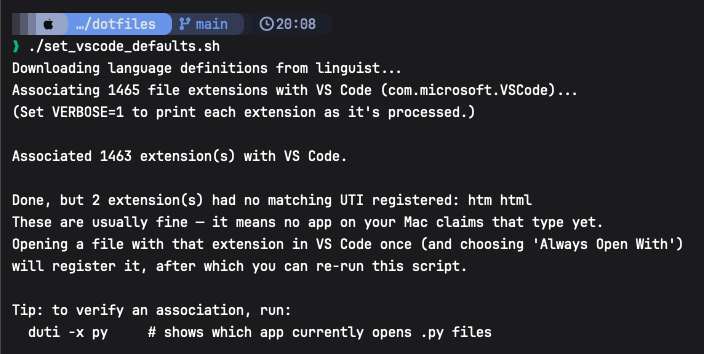
echo "Associated $OK_COUNT extension(s) with VS Code."

echo
if [[ ${#FAILED[@]} -eq 0 ]]; then
  echo "Done. All extensions associated with VS Code."
else
  echo "Done, but ${#FAILED[@]} extension(s) had no matching UTI registered: ${FAILED[*]}"
  echo "These are usually fine — it means no app on your Mac claims that type yet."
  echo "Opening a file with that extension in VS Code once (and choosing 'Always Open With')"
  echo "will register it, after which you can re-run this script."
fi

echo
echo "Tip: to verify an association, run:"
echo "  duti -x py     # shows which app currently opens .py files"
Instructions to use:
- Save the code to a file named
vscode_detaults.sh - Make it an executable with
chmod +x vscode_detaults.sh - Run it with
./vscode_detaults.sh
Publish date: 2026-06-18 20:06:16 +0530 ISTAuthor: AlanWeek: 2026-W25Month: 2026 - 06-June